NetNewsWire icon

NetNewsWire Blog

News from the newsreader

NetNewsWire 7.3 for Mac

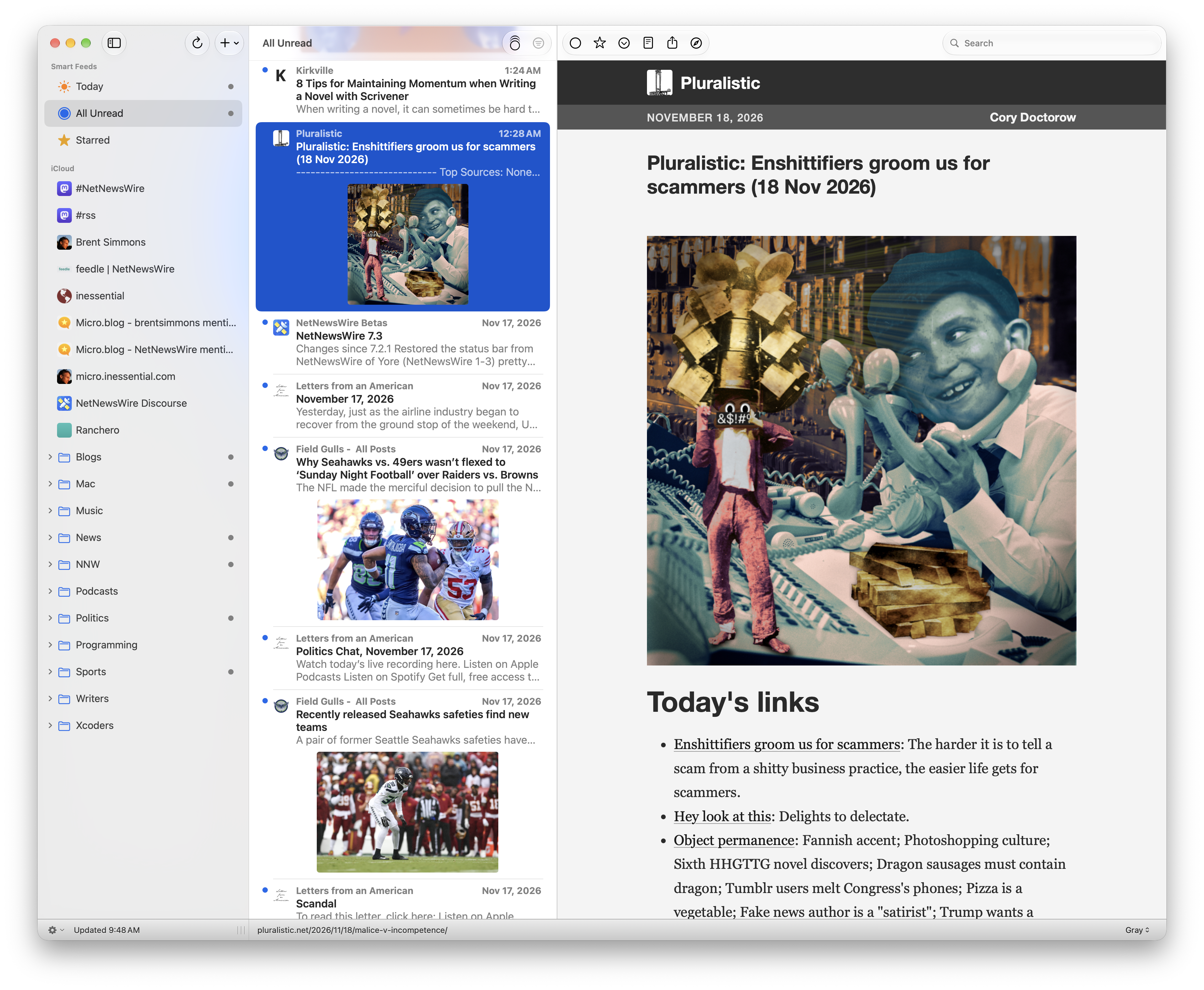
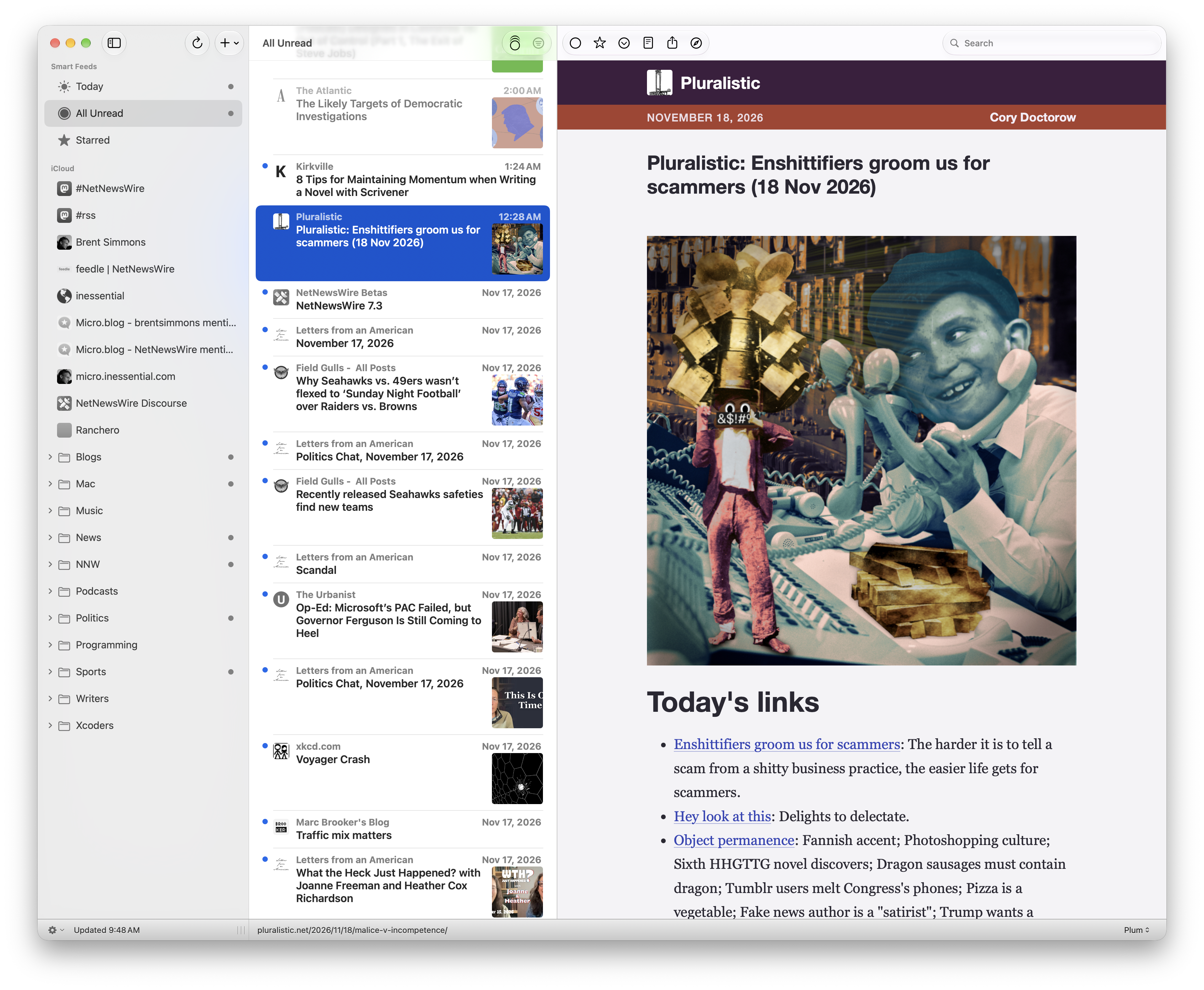
NetNewsWire 7.3 for Mac brings our most commonly requested feature (by far!) to life: it now shows thumbnails in the timeline. (This is a feature that some later versions of NetNewsWire of Yore had, and we’re glad to finally bring it back.)

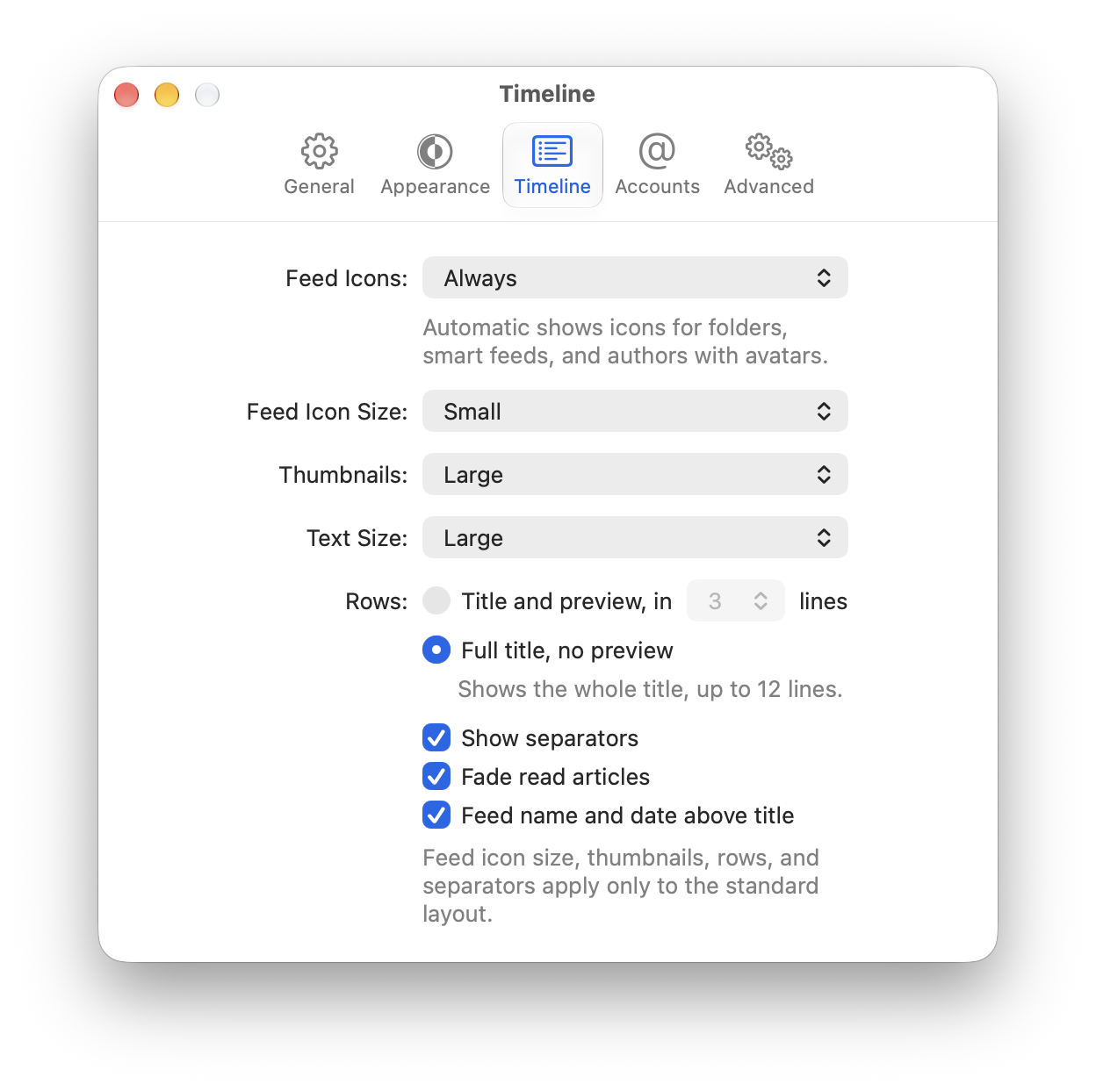
Thumbnails can be large or small — or none, which is the default, since it does take extra bandwidth, memory, and storage to download and store them.

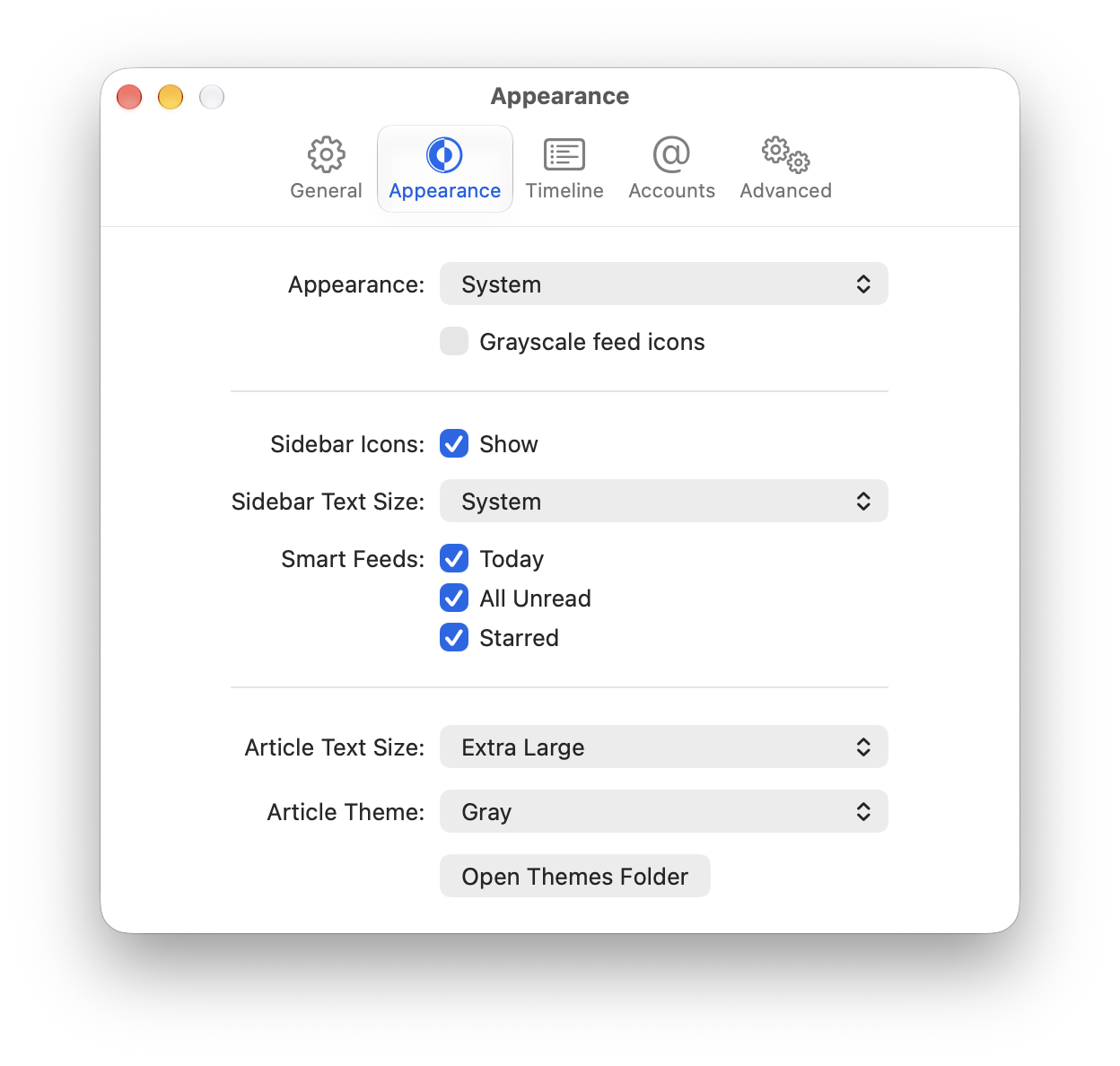
Other new features include a status bar, restored from NetNewsWire of Yore pretty much exactly as it was; support for enclosures and Media RSS (which means more images, audio, and videos will appear as intended by the publishers); and a bunch of new settings for customizing the look of the app.

See the change notes for the full scoop.

Get the update the usual way: NetNewsWire > Check for Updates… or download the latest version of the app.

Some screenshots…

Large thumbnails

Small thumbnails

Appearance settings

Timeline settings

Heads-up for Theme Authors

NetNewsWire 7.3, currently in beta, adds a bunch of features for parsing enclosures and enclosure-like things (MediaRSS especially) — which means some articles get more pictures, audio, and video than before.

To make this work we added a couple new tags for themes: one for the primary media and one for enclosures. Read all about it on the Discourse forum, and please ask any questions you may have.

How We Got Duo Support in NetNewsWire

The latest version of NetNewsWire for iOS supports iPhone Duo, which is very much a novel iPhone with toolbars running up the side and all kinds of behavior.

How we did it: we didn’t do any work at all. We built the app using Xcode 27.1 and the default iOS SDK that comes with it, and that’s it.

Here’s the thing, though: we were already using standard controls — toolbars, navigation controllers, split views, etc. — and we were paying attention to size classes and such (as opposed to just looking at device type).

There is a good list of reasons to use standard controls in the standard ways, and near the top of that list is to be ready for these kinds of days, so we’re not bogged down for a month or more trying to adapt to big changes like this.

Here’s a secret: Brent didn’t even run this in the Duo simulator before releasing it. We were ready to not claim Duo support and just handle Duo in the next release. But here it is.

PS Of course there may be edge cases and issues in our Duo support we haven’t caught yet. We stand by, as always, ready to field and fix bugs.

PPS Thank you to all the engineers, designers, and testers at Apple who made this work so easily! Again, we didn’t do anything but build with the new SDK. Their achievement is pretty remarkable.

NetNewsWire 7.2 for iOS: unread count hiding, performance enhancement

NetNewsWire 7.2 for iOS has passed App Store review and is available or soon will be.

It has the same hide-unread-counts feature the Mac app has — you can hide them entirely or replace them with a dot. See the settings screen, Appearance section.

It also fixes a bunch of bugs — see the release notes for the full scoop — including one we’ll call out specifically: where the releases notes say “Sped up Today and unread count queries” the notes are underselling a pretty big performance enhancement and battery-use fix during refreshing. The app was doing way more work than needed to maintain the Today unread count, and now it’s doing just the right amount.

PS Back to the unread counts — remember that your RSS reader is not supposed to feel like a chore! You don’t have to read everything. Mark All as Read is a no-guilt option!

PPS Seems like the app works with Duo. As always, let us know, on the forum or on the bug tracker, if you find any issues.

NetNewsWire 7.2 for Mac: column layout, unread counts

We’ve released NetNewsWire 7.2 for Mac with a new column view layout: choose View > Use Column Layout to switch. (Choose it again to switch back.)

This is a new feature in the sense that the previous version of the app didn’t have it — but NetNewsWire of Yore, before the 2018 reboot, certainly had this feature. Even NetNewsWire 1.0 had this feature! In fact, back in those days it was the only layout. In some ways this is the oldest NetNewsWire feature and we’re celebrating its triumphant return. :)

We like this feature in part because it’s super Macintosh where the default timeline is definitely iOS-inspired.

Anyway. We’ve also added a second long-requested feature: you can now hide unread counts or replace them with a •, so you don’t have to deal with the anxiety of an ever-increasing unread count and the feeling like you have to get caught up. (Tip: remember that Mark All as Read is your friend!)

(The unread counts feature is also coming to the iOS app as soon as it gets through App Store review.)

Click the screenshot below for a large version showing both of these features (column layout and unread-counts-as-dots) at once:

Get your updates the usual way: do NetNewsWire > Check for Updates… or download the latest version of the app.

How to Beta Test NetNewsWire

We very much appreciate the bug reports and feedback from NetNewsWire beta testers — and we want to make sure that everyone who might be interested in helping this way knows how to get started. It’s easy. 😀

So we’ve written up a new How to Beta Test NetNewsWire page. Want to help make NetNewsWire a better app? This is how!

NetNewsWire 7.1 for Mac

NetNewsWire 7.1 for Mac includes new features that help you understand what’s up with your feeds:

  • The Current Activity window shows what the app is doing right now
  • The Activity Log window shows what the app did recently
  • The Account Stats window shows per-account article and status counts and database sizes, and it includes a Vacuum Databases button which can help with database size and performance
  • The Dinosaurs window lists feeds that haven’t updated in n months (with a text field where you specify n)

There are a bunch of other bug fixes and enhancements — see the release notes for the full scoop.

To update, do a Check for Updates in NetNewsWire or download the app directly.

PS NetNewsWire 7.1 for iOS will be out as soon as it gets through App Store review. Soon!

PPS Also: if you have feedback or questions, check out our forum.

NetNewsWire Now Getting Feed Images from RSS

In NetNewsWire 7.0.5 we made a change to get the feed image from RSS via the image element.

Weren’t we already doing this? Seems surprising that we weren’t!

It’s because, historically, these images were often rectangular — but the app wants square images. These days, probably due to the influence of mobile apps, images tend to be square, which is great. It means we can use these.

Note to feed publishers

We suggest checking your feeds to see if they are supplying an image URL. Check that…

  • You’re supplying a URL in the <image> element in the channel

  • The image URL doesn’t return 404 or something unexpected

  • The image is square

  • The image isn’t small: 128 pixels per side is probably a good minimum

Note, though, that due to NetNewsWire’s caching — because it’s trying to not hit servers too often — it’s difficult to debug this using NetNewsWire. Changes may take days to take appear in the app.

But if you’ve done the above checks, then it’s good.

What happens when there is no feed image

NetNewsWire will continue to do what it has done for years — it will try to find a suitable feed image by downloading the home page and looking for apple-touch-icon, twitter:image, and og:image URLs. This uses more bandwidth, unfortunately, but it works.

This is why it’s definitely better to supply a feed image. Don’t make the app go poking around!

Example

Here’s an example feed image from Dave Winer’s Scripting News RSS feed:

<image>
    <title>Scripting News</title>
    <url>https://imgs.scripting.com/2025/06/04/curly.png</url>
    <link>http://scripting.com/</link>
    <description>Scripting News gets an image because it's part of a network that uses them. 6/4/25 by DW</description>
    </image>

The part that NetNewsWire looks at is the <url> part. (We don’t have a use currently for the other parts.)

PS

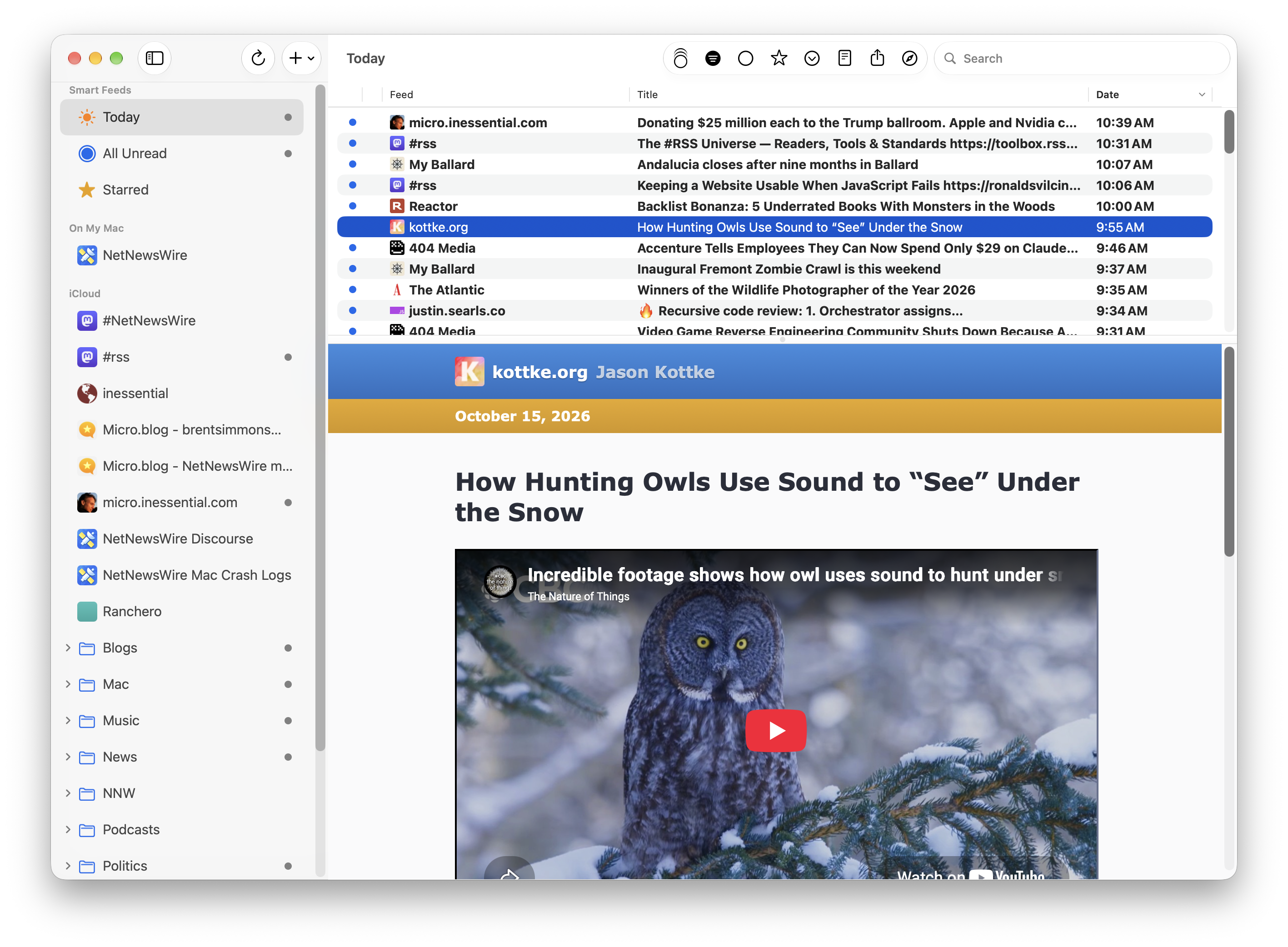
In case you’re not a NetNewsWire user or aren’t sure what we’re talking about — here’s a screenshot showing a list of articles with feed images on the left:


Feed images appear in a timeline in NetNewsWire.

NetNewsWire 7.0.4 for iOS — runs on iOS 17 and up

NetNewsWire 7.0.4 is out — get your updates the normal way or download from the App Store.

There are two big changes in this release: it now runs on iOS 17 and up (it no longer requires iOS 26), and it includes the same new iCloud syncing enhancements that the Mac version has.

See the new How to Optimize iCloud Syncing page for details on the iCloud changes, and read the release notes for details on all the changes.

If you have questions or run into any issues, remember that you can always get help on the NetNewsWire forum and report bugs on the issues tracker.

NetNewsWire 7.0.4 for Mac — new iCloud features

We’ve just released NetNewsWire 7.0.4 for Mac. Do a Check for Updates or download it directly to get the update.

The big new changes are to iCloud syncing: there’s a new setting to not sync the content of unread articles, since that’s the biggest part of your iCloud database and what takes the longest to sync.

Another change is a new iCloud Storage Stats window that tells you exactly what’s in your iCloud storage — and it includes a Clean Up button that will trim down your storage (and lead to faster syncs in the future, though not necessarily right at first).

All of this and more is documented on the new How to Optimize iCloud Syncing page.

(Yes, these features are coming to iPhone and iPad too, as soon as the app gets through App Store review.)

Also note, in case you missed it earlier, that NetNewsWire for Mac runs on macOS 15 and up. It no longer requires macOS 26. (Similarly: the upcoming iOS release will run on iOS 17 and up. We want as many people as possible to get these iCloud changes.)

The iCloud changes aren’t the only changes — see the release notes for the full scoop.

As always, you can get help on the NetNewsWire forum and report bugs on the issues tracker.

Testing Help for NetNewsWire 7.0.4 — runs on iOS 17 and iOS 18

We just released a TestFlight build of NetNewsWire 7.0.4 (which includes iCloud syncing enhancements) that runs on iOS 17 and up. (It had required iOS 26.)

If you have a device running one of these versions of iOS, we’d appreciate it if you would help test. Here’s where to sign up for TestFlight for NetNewsWire.

Thanks!

You can report bugs via TestFlight feedback, on the forum, or on the bug tracker. Whatever works for you is cool with us 😀

Also: this page talks about the iCloud syncing enhancements in 7.0.4.

NetNewsWire User Creates MCP Support Via AppleScript

Jelly writes on the NetNewsWire Discourse forum:

I’ve drafted a naive implementation of NNW MCP support through AppleScript. It supports listing feeds, getting/searching articles, subscribing new feeds…

I can now schedule a daily task that lets Claude summarize that day’s new articles and order them based on my previous behaviors every morning.

We love how AppleScript support is worth way more than the effort we put into it — users can keep creating cool things that we couldn’t have imagined back then.

To be clear: we didn’t do anything in NetNewsWire to support AI, LLMs, or MCP, but, since the app is scriptable, you can do all kinds of useful things with it.

Here’s the netnewswire-mcp repo on GitHub.

NetNewsWire 7.0.2: The Return of the Error Log

NetNewsWire of Yore had an Error Log window (on Mac) which could help you figure out what’s going on when a feed or account is acting weird — when it’s stopped updating, for instance.

NetNewsWire 7.0.2 brings that feature back, and we’ve already used it to help fix a syncing authentication bug (bug fix will be in 7.0.3).

Get your updates the usual way and enjoy the return of the Error Log!

For more details, plus screenshots, see How to Use the Error Log.

Testing help for NetNewsWire 7.0.1 beta needed — runs on macOS 15

NetNewsWire 7.0 required macOS 26, but now we’re working on making it compatible with macOS 15.

This latest beta — either do a check-for-updates or download it manually to get it — runs on macOS 15.

So far we’ve found just a couple cosmetic glitches, but we’d like to do a lot more testing than just a few quick looks around. We appreciate all the help!

You can report bugs on the bug tracker or on the Discourse forum topic for this beta.

(If you’re reporting on the bug tracker, please be sure to specify that you’re running macOS 15, if you are, and specify which version of NetNewsWire. Thanks!)

NetNewsWire Turns 23

NetNewsWire 1.0 for Mac shipped 23 years ago today! 🎸🎩🕶️

Here’s where things are on this particular February 11: we just shipped 7.0 for Mac and iOS, and now we’re working on NetNewsWire 7.0.1.

After a big release, no matter how careful we are, there are often some regressions to fix and tweaks to make right away, so we’re working on those. Here’s the milestone with the current to-do list.

Big picture: we still have a lot of bugs to fix, lots of tech debt to deal with, and lots of polish-needed areas of the app. With Brent’s retirement last year we’ve been able to go way faster on dealing with all this. We plan to keep up the pace.

Here are our current plans:

For NetNewsWire 7.1 we’re focusing on syncing fixes and improvements.

NetNewsWire 7.2 doesn’t have a focus yet. Could end up being UX fixes and polish, could be something else. Could be a potpourri, though we do prefer having a focus when possible.

We don’t have a NetNewsWire 7.3 plan yet — that’s too far out. Depends on what actually happens with 7.1 and 7.2, and it depends on what Apple adds to our to-do list at WWDC this year. (Touchscreen Macs? Folding iPhones? Big new Swift features? Who knows!)

Note that we do add and remove tickets from milestones at any time — none of this is set in stone, of course.

It’s NetNewsWire’s birthday, but that’s a day to look forward, not to look back. The very best versions of NetNewsWire are still to come!